Thermo-Calc 2026b Available Now
Webinar on Thermo-Calc 2026b Release
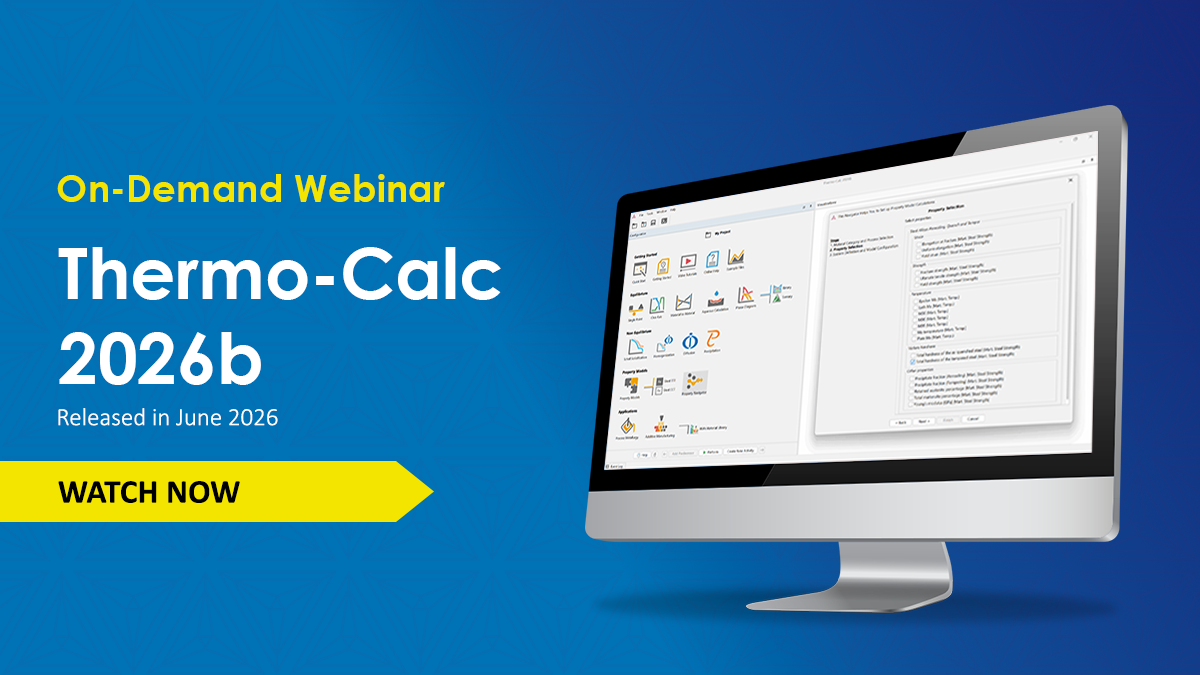
An on-demand webinar for Thermo-Calc 2026b is available to watch for free. In the webinar, our development team walks you through the most impactful new features, performance enhancements, and improvements included in this release. Watch now to get an overview of the highlights!
Property Navigator for Simplified Property Model Selection
The Property Model Calculator receives a major update with the introduction of the Property Navigator, a step-by-step guide that helps users configure Property Model calculations based on the desired scope (alloy system and processing route) and quantity of interest.
Property Model selection can be challenging, as it is not always clear which models contain which properties, or which models are adapted to a given processing route. The Property Navigator addresses this by guiding users through a process of selecting your desired material category and processing route (such as Casting, welding and AM, Isothermal treatment, or Annealing, Quench and Temper), then selecting the target properties you want to predict. Based on these inputs and the available license, the Property Navigator identifies suitable Property Models and databases and automatically configures the calculation and plotting upon clicking Finish.
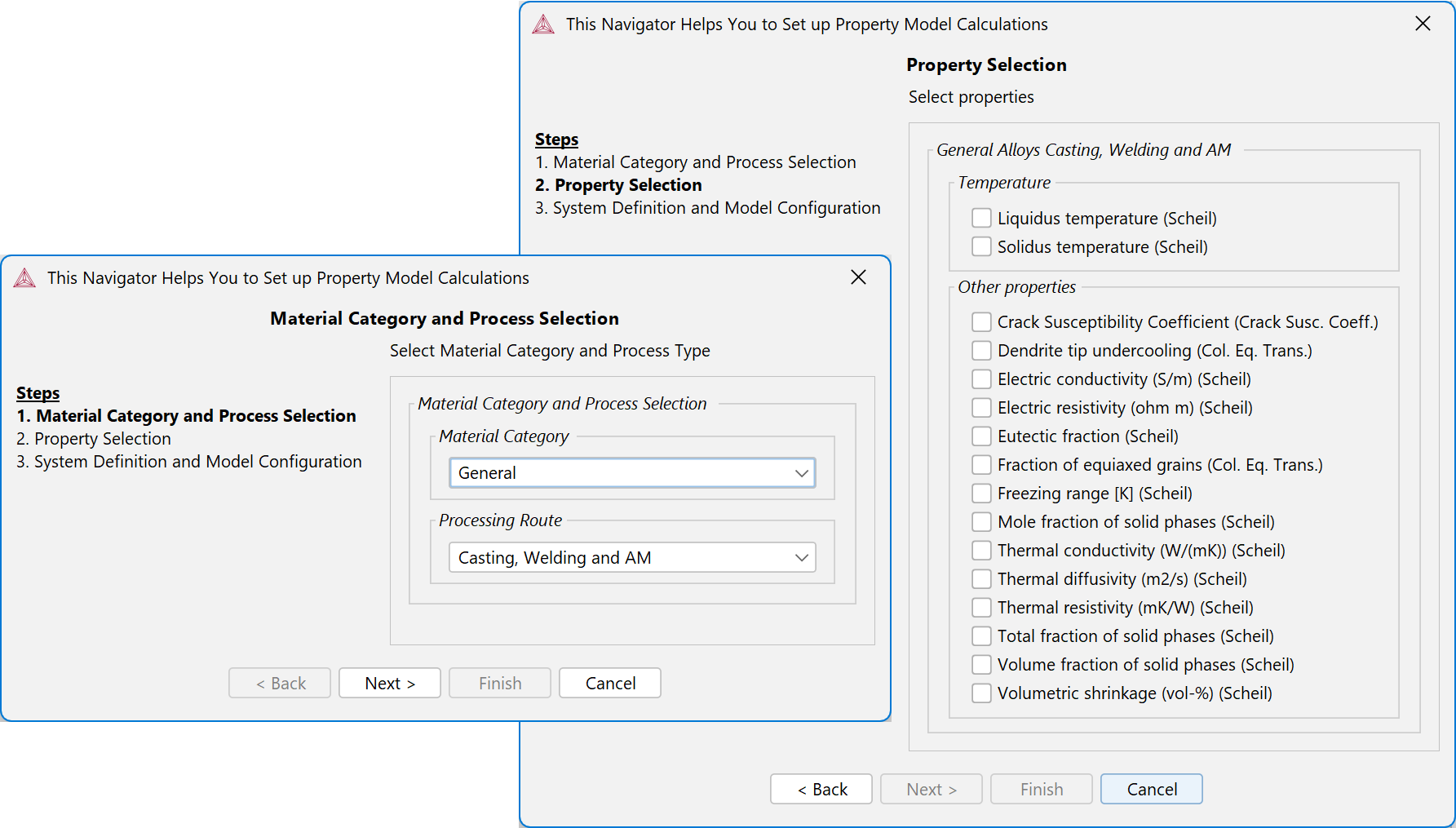
The new Property Navigator automatically selects the right Property Model(s) and configures your calculation using a step-by-step guide that allows users to select your material category, processing route, and target properties.
The Navigator offers a rapid way of setting up Property Model calculations, removes the need for manual model selection, and reduces dependency on inspecting plots or tables to identify available properties. Simulations can still be reviewed and fine-tuned manually after setup is finished.
 The Property Navigator is accessed from an icon on the home screen of the software and is included in all Thermo-Calc installations as part of the Property Model Calculator, along with 13 General Models. Users can purchase additional materials-specific Model Libraries.
The Navigator supports all Property Model types in 2026b for General, Nickel, Titanium, and Noble Metal Alloy Models. Many Steel Model Library Models are also included, but those that use the CCT and TTT diagram templates are not. See the release notes for more details.
Reduced Loading Time for Templates and Projects
Loading time has been significantly reduced when creating a new project from a template or opening a saved project file. Benchmarking shows that Thermo-Calc 2026b loads projects on average 2.2 times faster than Thermo-Calc 2025b, depending on calculation type.
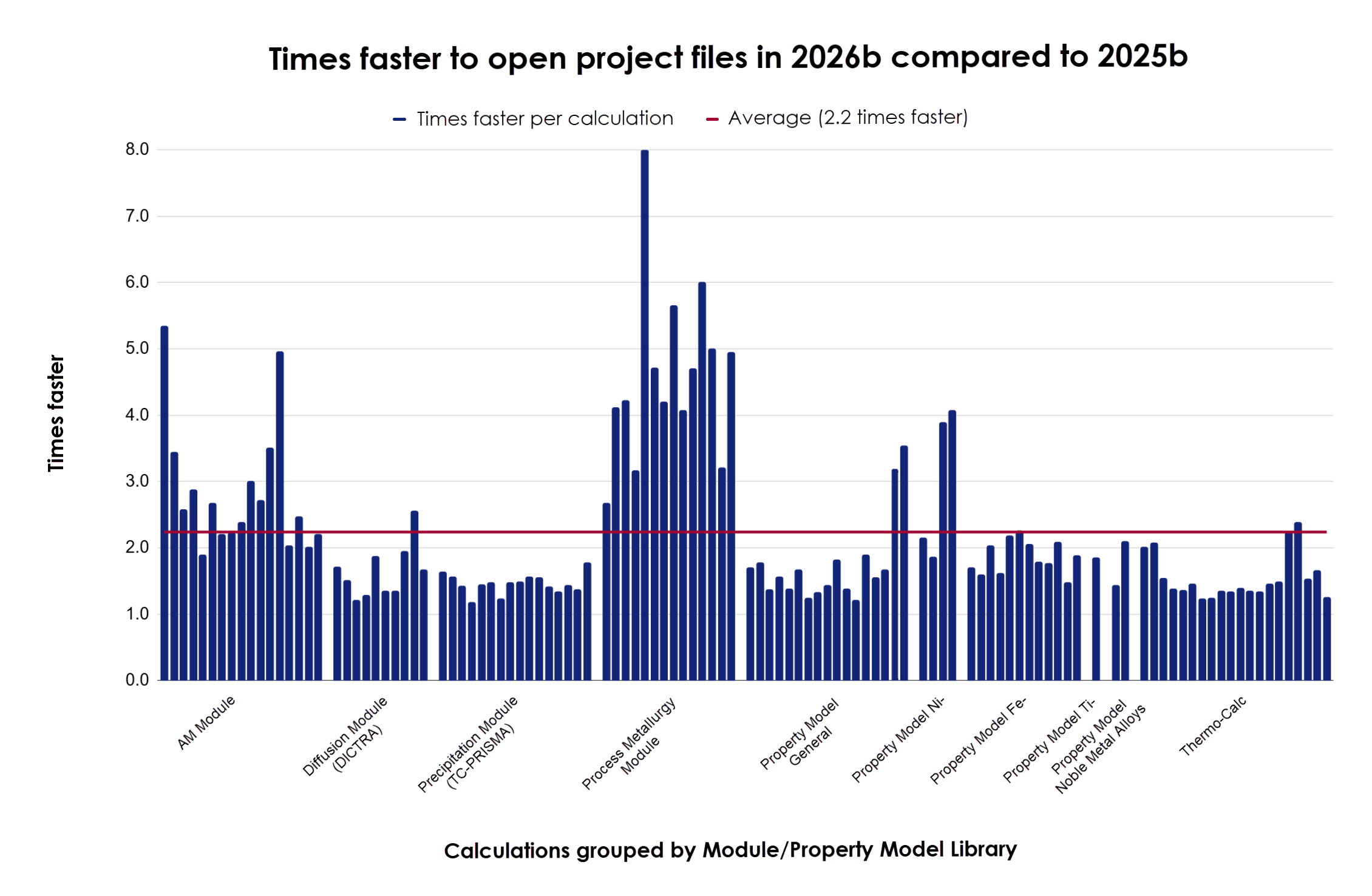
Comparison of project file opening times in Thermo-Calc 2026b and 2025b showing an average of 2.2x faster loading time for all calculations (red line), with improvements varying by calculation type.
No functionality was affected by these changes, but users may notice a change in appearance when opening projects. Previously, nodes were added to the project tree one at a time during loading. Now, all nodes are added at the end, and a project bar is displayed while the project loads.

A new progress bar now displays while a project is loading in Thermo-Calc.
These improvements are part of an ongoing effort to enhance overall application performance, and work will continue in coming releases.
Flow Stress Applied to Ti-base Alloys Hardness Model
The Alloy Strength – Ti Property Model in the Titanium Model Library has been expanded to a full flow stress model, allowing for the prediction of a full range of flow stress quantities, including hardness, stress at arbitrary strain, yield strength, ultimate tensile strength, Young’s modulus, and more. Previously, the Model was restricted to predicting hardness and yield strength.
Additionally, the model has been extended with an option to account for the formation of α’ and α’’ martensite and its effects on the hardness and flow stress properties. The user may now specify whether an alloy is susceptible to martensite formation and, upon doing so, will be asked to provide a Quench Temperature, in addition to the already existing Annealing Temperature field.
As a result of these changes, the legacy strength quantities have been replaced with the new quantities. Hardness quantities are still available as before.
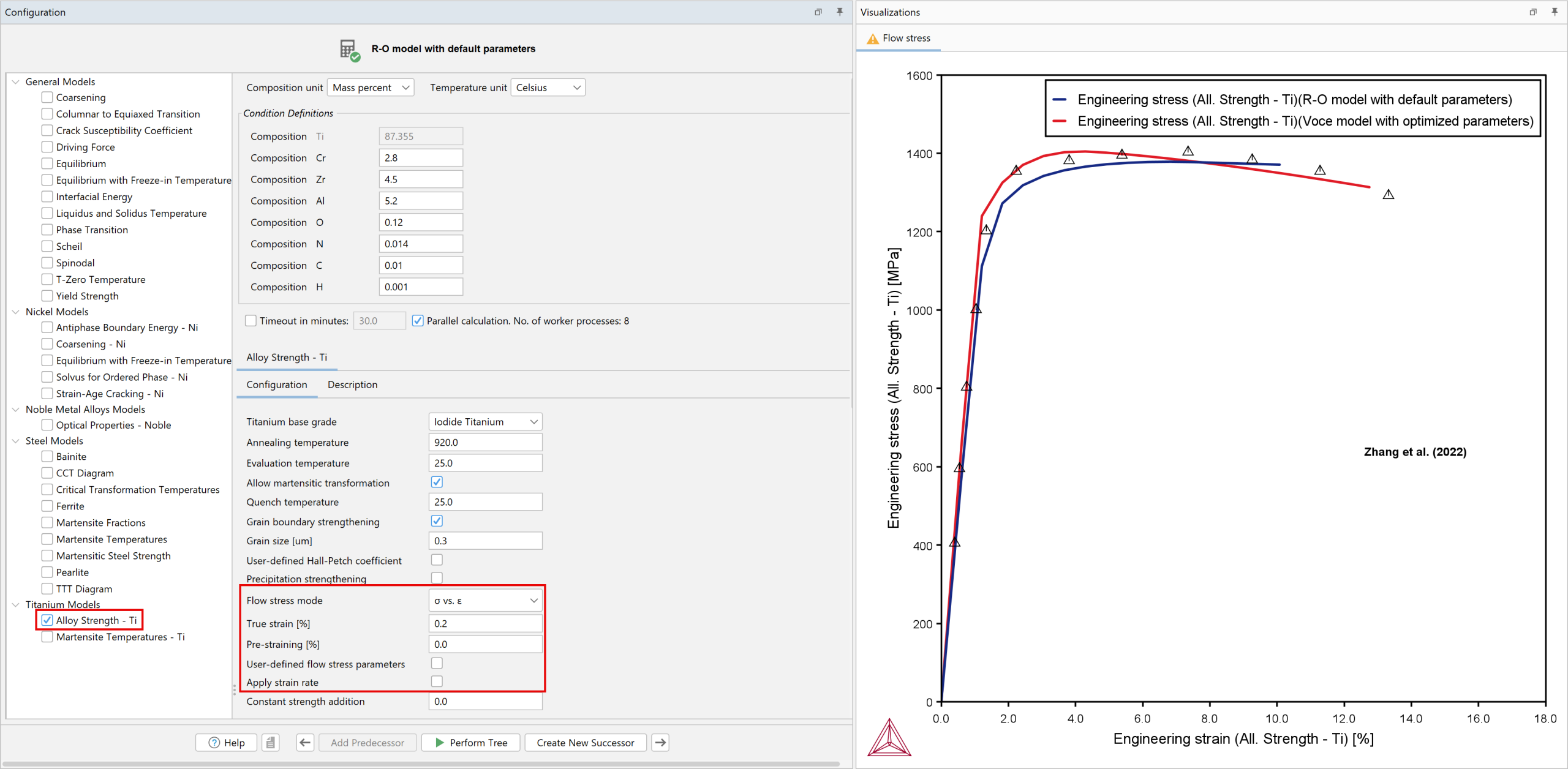
Configuration of the Alloy Strength – Ti Property Model, showing the expanded settings for the flow stress addition. Results show true stress as a function of true strain for a Ti-0.28Cr-0.45Zr-0.052Al-0.12O-0.014N-0.01C-0.001H alloy.
New Example
One new example is available demonstrating the expanded model:
TC-Python: Improved Property Model Calculation Setup
The setup of Property Model Calculations in TC-Python has significantly improved in this release. Previously, users were required to input specific string arguments for selection and configuration of Property Model Calculations. These strings were prone to errors, lacked consistent syntax, and the exact values were not available in our documentation. This required users to run calculations at least twice to retrieve valid values or compare directly with Thermo-Calc Graphical Mode.

Initializing a PropertyModelCalculation using the new PropertyModelSelection factory class (excerpt from pyex_PM_07_Property_model_Coarsening_Ni.py)
Several improvements have been introduced to simplify the setup process:
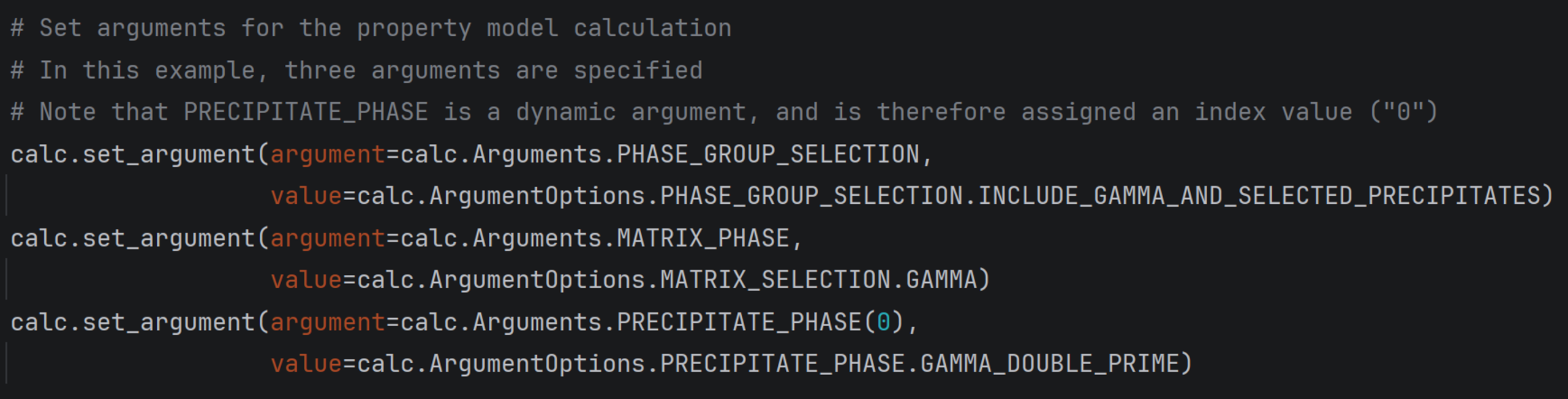
Setting arguments for a PropertyModelCalculation using the new property model definitions (excerpt from pyex_PM_07_Property_model_Coarsening_Ni.py)
Predict Composition Change Due to Evaporation in the AM Module
The Additive Manufacturing (AM) Module can now predict composition changes caused by evaporation during additive manufacturing.
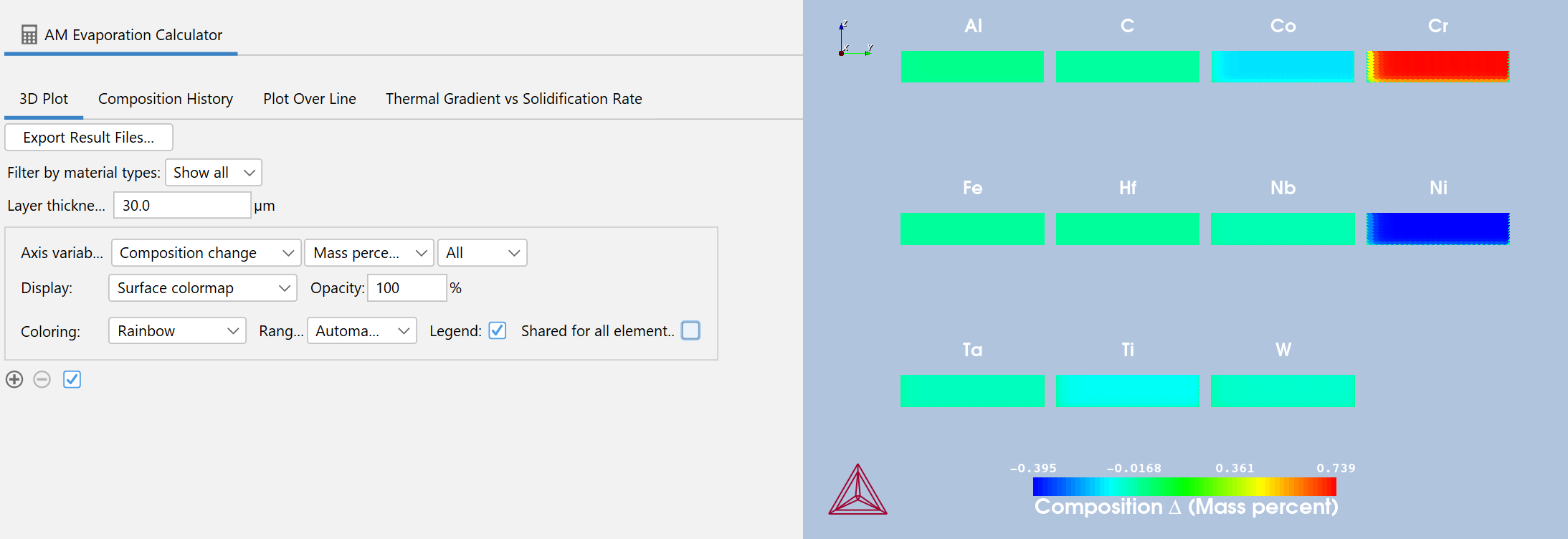 Calculated composition change of IN939 for a multi-track build at power 200W and scan speed 1.8m/s using the new Evaporation with Steady-state simulation mode.
When printing parameters are not properly optimized, volatile alloying elements may evaporate, resulting in deviations from the specified alloy composition. This loss of specification compliance can affect the final microstructure and key material properties, including strength, hardness, ductility, tempering response, and corrosion resistance. Together, these effects degrade the quality and consistency of the final part, making accurate evaporation modeling critical for process validation and qualification.
This enhancement is especially relevant for high-temperature processes using laser or electron beam heat sources, where light, volatile elements are most prone to evaporation.
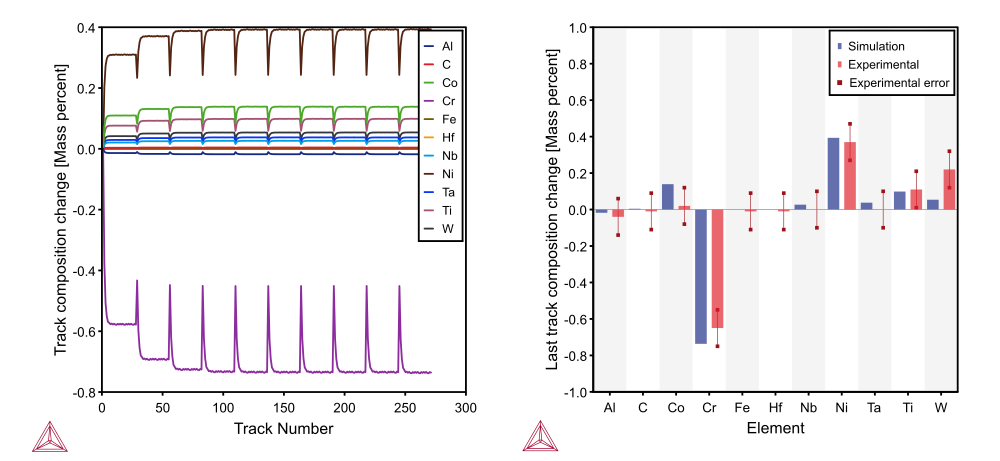
Left: Track composition changes due to evaporation as a function of track number of IN939, with 270 tracks. The large composition changes occur when a new powder layer is added. The final track (270) represents the average composition in a larger printed part. Right: Calculated last track composition, (track 270), of IN939 compared to experiments by Mukherjee et al. 2024.
New Calculation Type and Visualization Features
The feature is implemented as a new calculation type, Evaporation with Steady-state. The setup is similar to the Transient calculation type, with default values updated to more accurately simulate evaporation effects. The calculation type can simulate multiple tracks and layers and outputs the average printed composition for each track, as well as the average composition of the final part.
Three new plot quantities have been added to the Plot renderer to show printed composition and evaporated gas composition. Additionally, a new Composition History tab has been added for visualizing simulation results. Results can also be viewed in a table and exported.
Available in TC-Python
The new functionality is also available in TC-Python.
New Examples
Two new examples are included to demonstrate this new functionality, one in Thermo-Calc GUI and one in TC-Python:
Precipitation Module (TC-PRISMA) Improvements
Switch of Matrix Phase During Simulation
A new option, Allow for matrix switch, has been added to enable switching of the matrix phase between two predefined phases during a precipitation simulation, for example between austenite and ferrite.
When simulating precipitation in steels over a full heat-treatment cycle, the matrix phase may change due to structural transformations such as martensitic transformations. This new functionality enables more realistic modeling of systems where the parent phase is not stable throughout the process.
The switching condition can be defined based on either temperature or thermodynamic driving force.
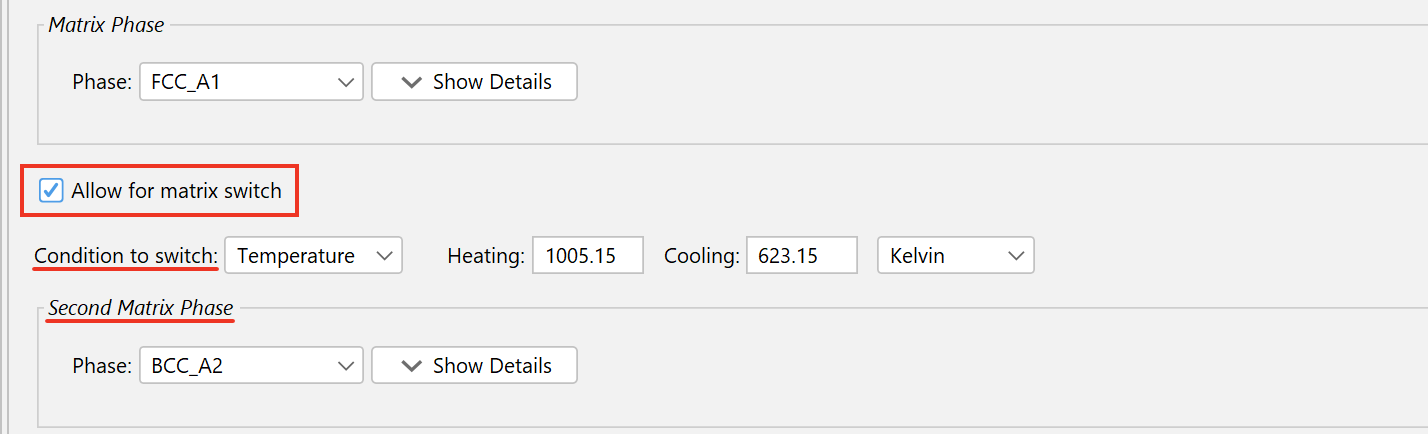 The new Allow for matrix switch option has been added to enable switching of the matrix phase between two predefined phases during a simulation. The switching condition can be based on either temperature or thermodynamic driving force.
New Example
A new example is available demonstrating the new Switch Matrix Phase functionality:
Nucleation on Another Precipitate
It is now possible to have precipitates nucleate from existing precipitates in systems with multiple precipitate phases in both the GUI and TC-Python. Previously, only bulk, grain boundaries, grain edges, grain corners, or dislocations could be selected as nucleation sites.
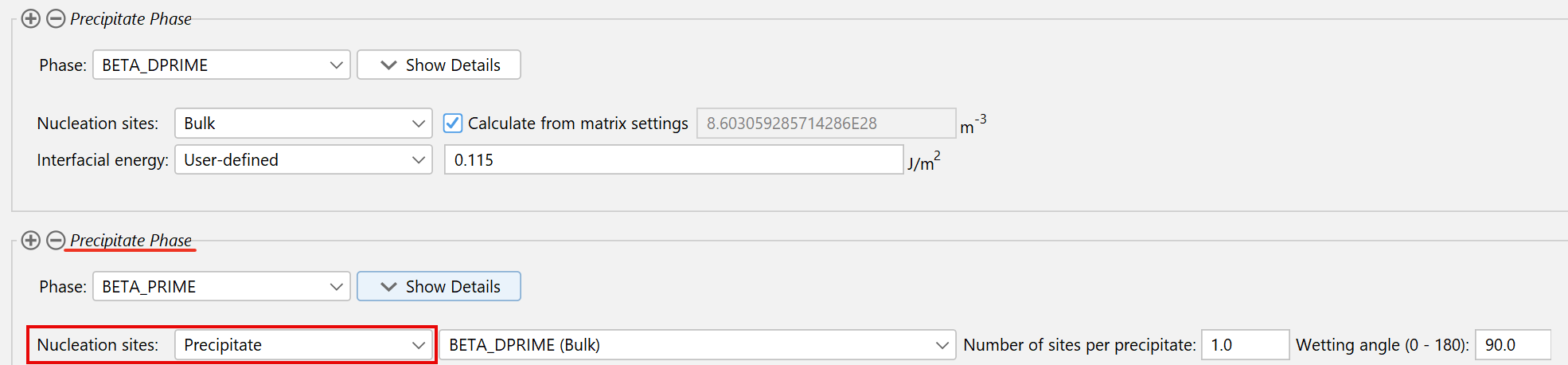
New settings in the Precipitation Module (TC-PRISMA) allows users to model precipitates as nucleation sites in systems that have more than one precipitate phase.
The new capability allows users to model:
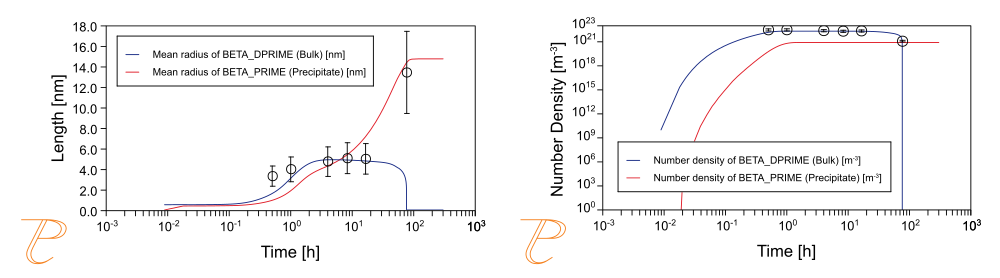
Left: Mean radius as a function of time. Right: Number density as a function of time. Both figures show the β”→β’ transition in Al-Si-Mg alloys compared with experimental data from Myhr et al (2001). The new ability to model precipitates as nucleation sites enables the simulation of complex precipitation sequences observed in Al and Mg alloys. The plots are from example P_17 in the software.
Available in TC-Python
The new functionality is also available in TC-Python using the following method:
.set_nucleation_upon_precipitates(precipitate1, site_per_particle, wetting_angle)
New Examples
Two new examples are available demonstrating this new feature, one in Thermo-Calc GUI and one in TC-Python:
Nine New Databases with Expanded Coverage
TCNI14: Nickel and Cobalt-based Superalloys Database
For this release, TCNI14 significantly expands the scope of the database by extending its applicability beyond Ni-based superalloys to also include Co-based superalloys and is therefore renamed to: TCS Nickel and Cobalt-based Superalloys Database. This means that predictions of key characteristics, including phase transformation temperatures, γ′ and secondary phase volume fractions, partition coefficients, and all previously available physical properties, are now available for both Nickel and Cobalt-based alloys.
MOBNI7: Nickel-alloys Mobility Database
TCAL11: Aluminium-based Alloys Database
TCSALT3: Molten Salts Database
TCCU7: Copper-based Alloys Database
MOBCU6: Cu-alloys Mobility Database
TCUHTM3: Ultra-high Temperature Materials Database
The development of TCUHTM3 was focused on the MAX phases related systems and the addition of Nb, Ti, and V.
TCMG9: Magnesium-based Alloys Database
For this release, one of the primary focuses was on revising the Gd–Mg system to align with newly determined experimental phase boundaries and the metastable phases that emerge during aging, thereby enabling age-hardening simulations using the Precipitation Module (TC-PRISMA). Furthermore, several ternary systems, including Ca–Mg–Zn, Ce–Mg–Zn, and Nd–Mg–Zn, were critically reassessed.
Updated Databases
TCS Steel and Fe-alloys Database
TCFE14.1 and TCFE15.1 are available for free to everyone who has TCFE14 or TCFE15, respectively, and a current Maintenance & Support Subscription.
TCS Mg-based Alloys Database
TCMG8.1 is available for free to everyone who has TCMG8 and a current Maintenance & Support Subscription.
TCS Metal Oxide Solutions Database
TCOX15.1 is available for free to everyone who has TCOX15 and a current Maintenance & Support Subscription.