Hoppa till innehål

Thermo-Calc 2026a Available Now

Introducing Thermo-Calc 2026a, with a powerful new aqueous calculator for easy set-up of advanced corrosion calculations, including Pourbaix Diagrams, common phase names in plots and tables for improved clarity, eight new databases with significant improvements, and much more.

Webinar on Thermo-Calc 2026a Release

Thermo-Calc Software 2026a release webinar
Sign up for our upcoming release webinar to explore the exciting new features and databases included in Thermo-Calc 2026a. Hear directly from several of the developers who contributed to this release as they share insights into these significant advancements.
New User-friendly Common Phase Names

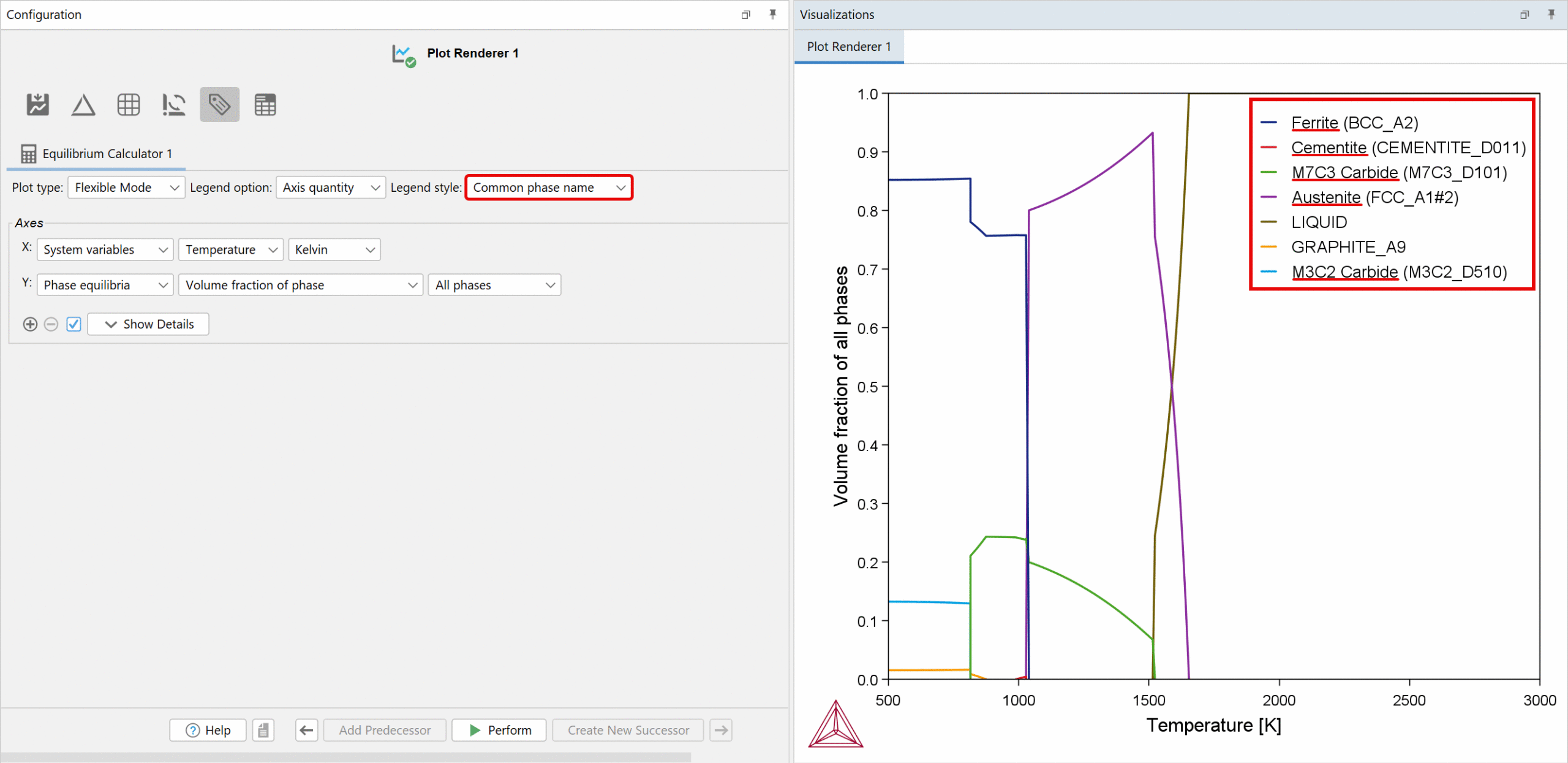
Thermo-Calc now offers the option to display common phase names in plots and tables when using certain databases, making the software more intuitive for users unfamiliar with CALPHAD phase naming conventions. Thermo-Calc has long used the traditional naming method, in which phases are named using crystallographic standards like FCC_A1 or BCC_A2, but now common names such as ferrite will appear by default, when available, alongside the standard names, making results easier to interpret and improving overall usability.

Common phase names are available in Graphical Mode, Console Mode, and in TC-Python for plots and tables when using a newer, larger database that includes the common phase names file. Databases that do not include the common phase names file will continue to display only the traditional phases names, as before.

common-phase-names

Common phase names now appear by default in plots and tables when using certain databases, making the software more user-friendly for users who prefer them over CALPHAD phase naming conventions.
Create Custom Phase Name Files

Common phase names are available when using one of our newer, larger databases in Thermo-Calc 2026a or newer. If you are using a database that doesn’t include a common phase names file, such as a custom database or an older database, you can create your own custom phase name list and read it into the software.

To learn more about this new feature, which databases include a common phase names file, and how to create a custom phase names file, read the Release Notes.

Improved Installation Process for Windows Users: Install Without Admin Rights

It is now possible to install Thermo-Calc without admin rights for most Windows users. Previously, you had to right-click on the installation file and select Run as Administrator. You were then required to enter your user credentials. Now most Windows users can simply double click on the program to launch the installation wizard, simplifying the process and saving time. Mac and Linux users still require Admin credentials.

New Aqueous Calculator for Easy Set-up of Corrosion Calculations

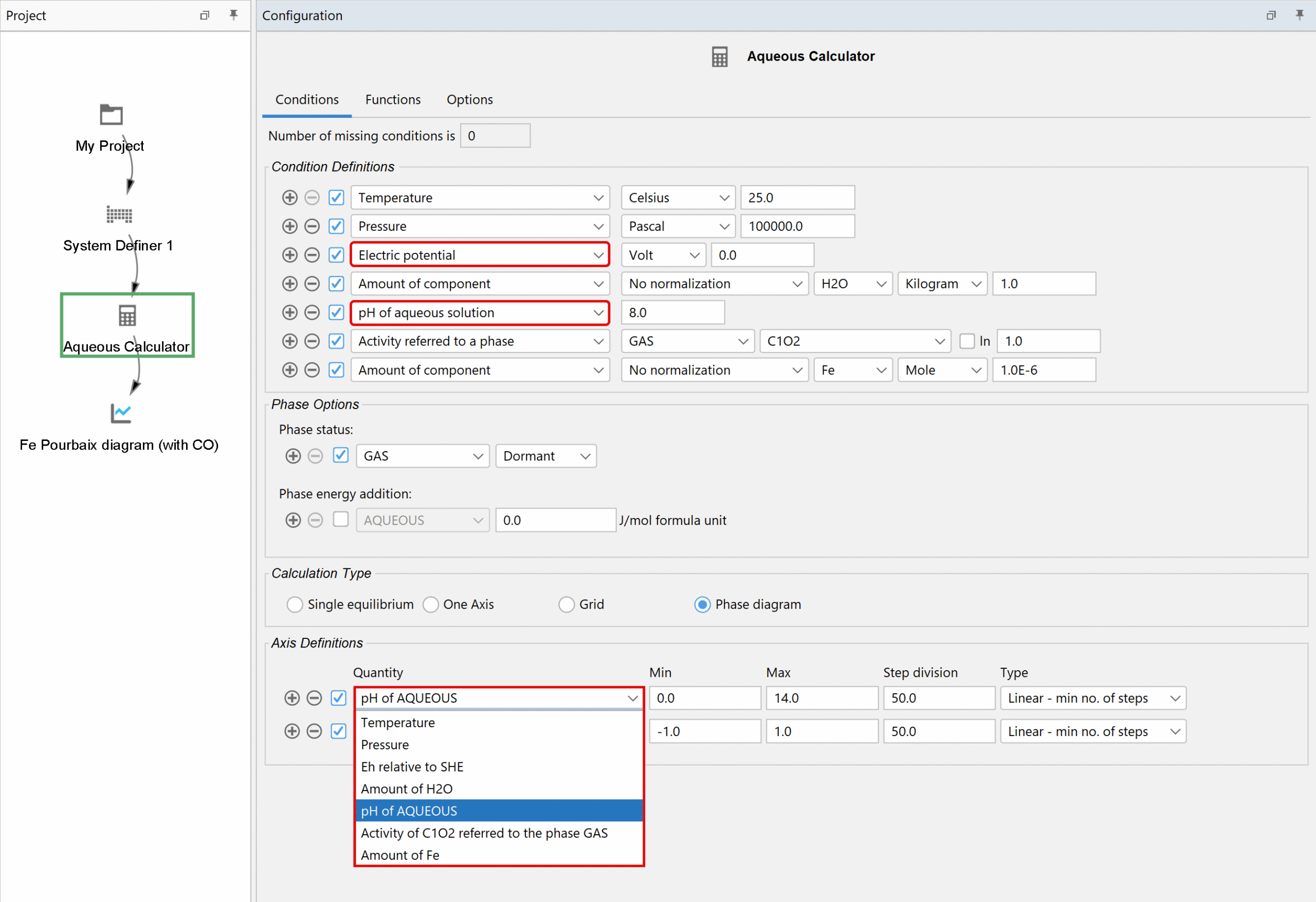
A new Aqueous Calculator has been added to the Graphical Mode, making it easy to set up advanced corrosion calculations, including Pourbaix Diagrams. Previously, these calculations were mainly available in Console Mode and required complex setup.

aqueous-calculation-template

A dedicated Aqueous Calculation template includes specialized settings to ensure accurate configuration of aqueous calculations, including corrosion, allowing you to configure complex calculations quickly with minimal manual input. Default parameters are optimized for aqueous systems, where solubilities are typically very low, ensuring accurate results without extra effort. The calculator also includes aqueous-focused quantities, such as Eh relative to SHE and pH of Aqueous solution, making setup fast and intuitive. Users are strongly recommended to use the template to gain the full benefits of the calculator.

aqueous-calculator

Configuration set-up for the new Aqueous Calculator, which has specialized settings and aqueous properties to make it fast and easy to set up complex corrosion calculations.
Expanded Plotting Options

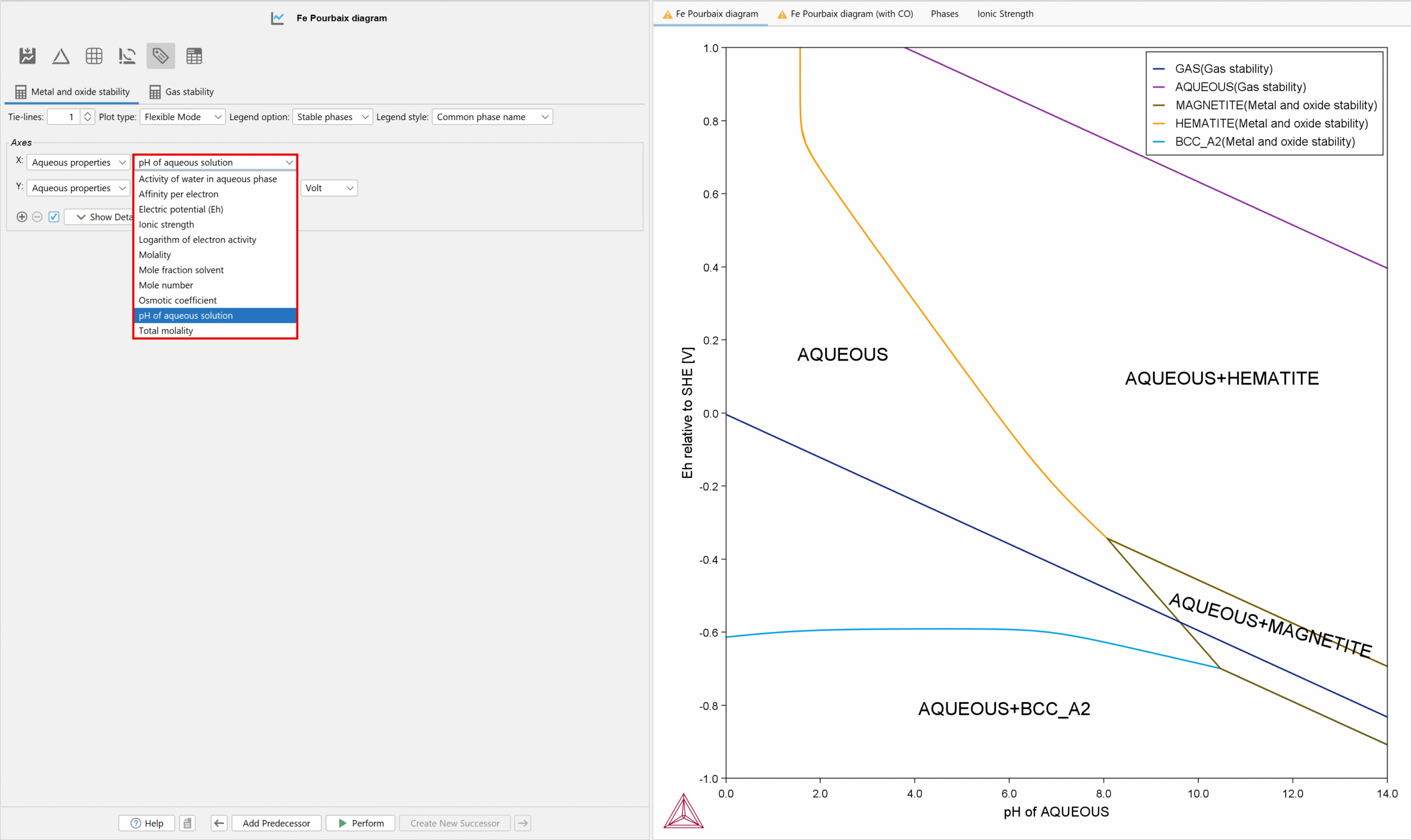
The Plot Renderer now includes a new category specifically for the new calculator: Aqueous Properties, which includes nearly a dozen aqueous properties such as pH, electric potential (Eh), ionic strength, osmotic coefficient, and more. You can also define axes using newly added quantities such as Eh relative to SHE and pH of the aqueous phase, as shown in the image above.

aqueous-calculator-plot-options-with-pourbaix-diagram

Plot settings for the new Aqueous Calculator, which includes a new Aqueous Properties category with nearly a dozen aqueous properties, and a Pourbaix diagram.

Optimized for the New TCAQ4 Database

The new Aqueous Calculator works best with the new Aqueous Solution Database (TCAQ4), which was greatly expanded in this release to be fully optimized for the Aqueous Calculator. When using TCAQ4, there’s no need to append databases with gas, solid phases, and oxide phases because they are all included in the TCAQ4 database and available by default. While you can still use AQS2 or the free PAQ2 database, TCAQ4 delivers the most accurate results

Try the New Aqueous Calculator with the Included Examples

To help you get started, we’ve added two examples showcasing how to use the Aqueous Calculator. Both examples use the free PAQ2 database included with all installations, so all users of Thermo-Calc 2026a and newer can try the new calculator.
  • T_21_Aqueous_Fe-Pourbaix.tcu
  • T_22_pH_of_Aqueous_Solutions.tcu

Change Phase Status in Equilibrium Calculator

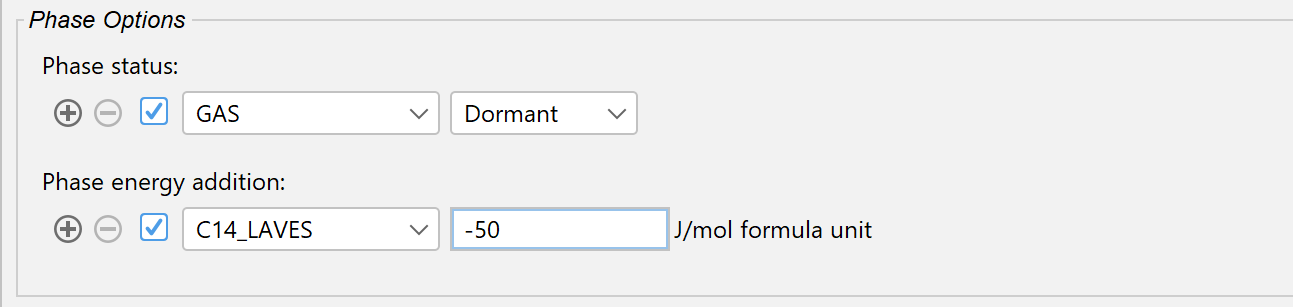
Users can now suspend phases or set them to dormant directly in the Equilibrium Calculator. Previously, this required navigating back to the System Definer, changing them there, and then re-loading the database, which often took a long time. With this update, changes can be made directly in the Equilibrium Calculator and without reloading the database, saving time and improving workflow efficiency.

This enhancement is particularly valuable for meta-stable calculations.

Phase-options

Two new features in the software allow users to change phase equilibria in Graphical Mode, simplifying the workflow and allowing for more precise calculations: 1) Change Phase Status is discussed directly above and 2) Phase Energy Additions are discussed directly below.

Phase Energy Additions in Equilibrium Calculators and the Precipitation Module (TC-PRISMA)

Thermo-Calc 2026a introduces a way to add phase energy additions to phases in the Equilibrium Calculator, including the new Aqueous Calculator (see image above). This helps you fine-tune phase stability, which is useful when you want to slightly adjust transformation temperatures or equilibrium amounts.

It is also useful for precipitation simulations. Although this was already possible in the Precipitation Module (TC-PRISMA), it was difficult to see how the energy contributions were affecting the property diagram and solvus temperature. With this new functionality, you can now calculate this in the Equilibrium Calculator and use those results to fine-tune calculations in the Precipitation Module (TC-PRISMA), for example to adjust a solvus temperature that is close but not quite correct. The following Figure illustrates how phase energy additions change the predicted dispersion and property diagram, respectively.

phase-energy-additions

Left: shows the impact of the phase energy addition upon the size distribution predicted after continuous cooling of a Ni-Al-Cr alloy from a super-solvus temperature. Right: shows how the solvus temperature and property diagram is changed by the phase energy addition.
Precipitation Module (TC-PRISMA) Receives Time-Saving Improvements

The Precipitation Module (TC-PRISMA) includes two new settings to speed up simulation time and boost performance, in addition to the Phase Energy Additions discussed directly above.

New Save Frequency to Reduce File Size and Speed Up Post-Processing

save-options-TC-PRISMA

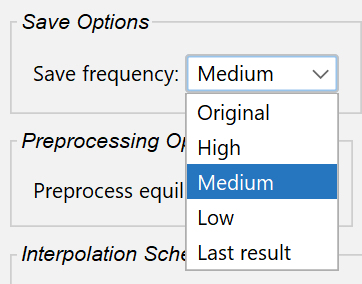
A new setting in the Precipitation Module (TC-PRISMA) lets you control how often simulation data is saved, allowing you to reduce file size and increase simulation speed, or choose to save more data when necessary.

The improvements to computation time come from post-processing. The time to do the precipitation calculation is slightly longer, but post-processing is now significantly faster, saving time overall. This is particularly beneficial for multi-layer AM simulations, which were prohibitively slow in previous releases.

The New Save Options are:

  • High: Captures all behavior in detail but may increase simulation time and file size. Recommended if you care about the size distribution at different times during the simulation.
  • Medium: Balances detail and efficiency.
  • Low: Saves only when dispersion changes, which reduces file size and runtime, but may miss some behavior.
  • Last Result: Saves only information about the precipitates for the last time-step. Ideal for high-throughput calculations where small file sizes are important.

Note that if you are modeling grain growth or doing CCT or TTT simulations, these new save frequencies are not available, and the program uses the older save frequency, known as Original.

Improved Interpolation Scheme for CCT and TTT Performance Boost

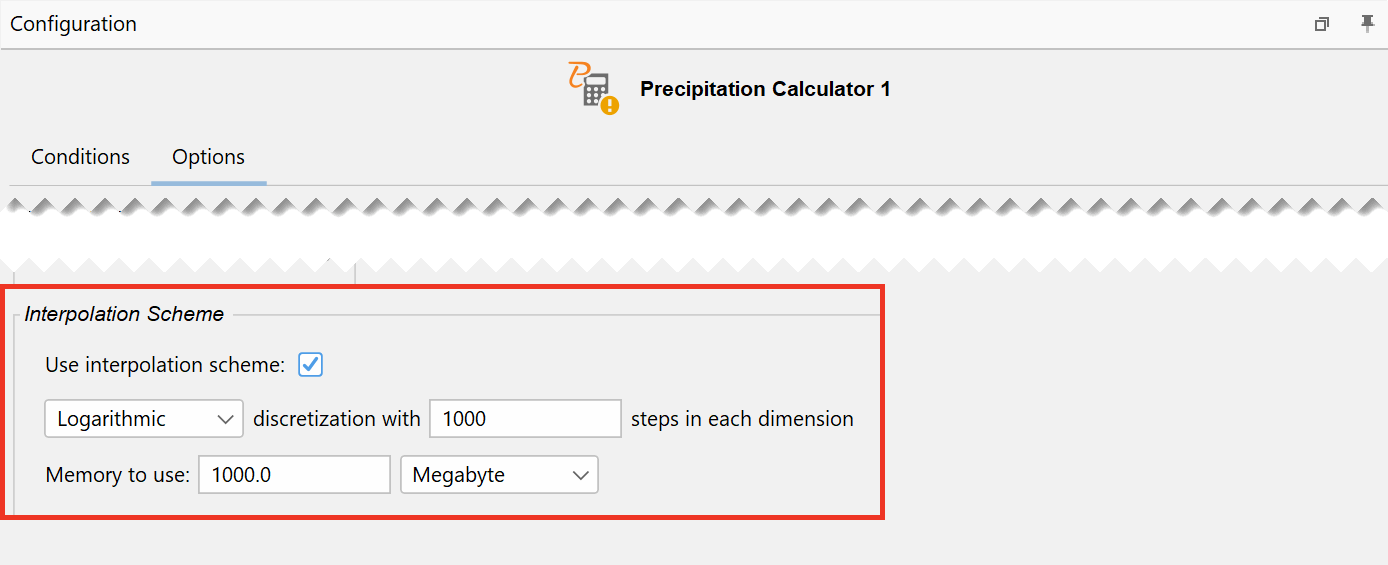
The Precipitation Module (TC-PRISMA) now offers an advanced interpolation scheme that reuses information from previous steps whenever possible, reducing the time needed for complex simulations. The advantage of using interpolation is mainly realized when doing CCT and TTT calculations, where the same matrix compositions are revisited repeatedly.

This new feature can make some simulation types slower, so we have not turned it on by default. It is recommended for cases using the simple growth rate model and scenarios where the temperature does not exceed the solvus, or the matrix does not get severely depleted from precipitate forming elements, particularly CCT and TTT diagrams that meet these criteria.

Improved-Interpolation-scheme-Precipitation-Module-2026a

New Interpolation Scheme settings in the Precipitation Module (TC-PRISMA) reuse information from previous steps whenever possible, reducing the time needed for complex simulations.

Electron Beam Melting Added to the AM Module

The Additive Manufacturing Module (AM Module) now supports Electron Beam Melting (EBM). Previously, the module was only applicable to the Laser Powder Bed Fusion process, but with the 2026a release, all the functionality of the AM Module extends to the EBM process as well. This is done by adding Electron Beam as a heat source with Gaussian energy distribution and calculating the absorptivity as a function of chemical composition, acceleration voltage, and incident angle.

As with the Laser Powder Bed Fusion process, users can choose between quick steady-state simulations for fast melt pool estimates or detailed transient simulations to see how melt pools and heat distribution evolve during single or multi-track builds. Note that spot melting (point melting) is not supported in the AM Module.

A major advantage of EBM over Laser Beam is its ability to process crack prone materials while reducing residual stress and increasing build rates. The high build temperature, vacuum conditions, and efficient energy absorption of the electron beam make EBM suitable for alloys that are difficult to print with lasers, such as gamma titanium aluminides and certain nickel-based superalloys.
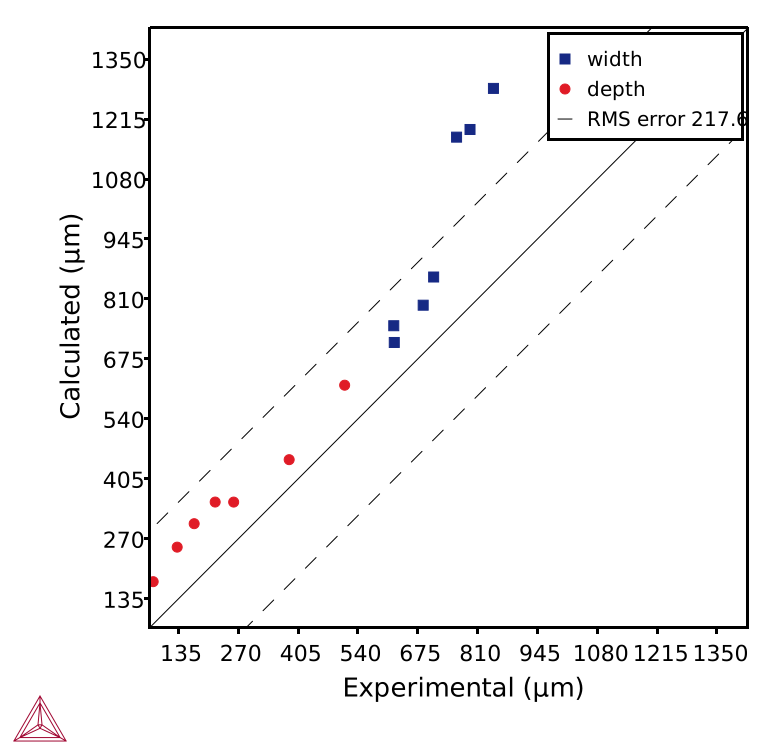
Parity plot comparing experimental and calculated melt pool width and depth using the Electron Beam Melting heat source introduced in Thermo-Cacl 2026a.

A parity plot comparing experimental and calculated melt pool width and depth using the Electron Beam heat source for an IN718 alloy. The Root Mean Square (RMS) error can also be seed as a dashed line.

Try the New EMB Heat Source with the Included Examples

Two new examples are added to highlight the use of the new Electron Beam heat source: One for Graphical Mode and one included with TC-Python installations.

  • AM_15_Electron_Beam_Melting_IN718.tcu
  • pyex_AM_12_Electron_Beam_Melting_IN718.py

AM Module Now Allows Separate Powder Properties with Fluid Flow

Users can now select to use both Fluid flow and Separate material properties options at the same time when running AM simulations, enabling simulations that more closely reflect real-world conditions.

Previously, users had to choose between these two options, but with our latest release, we’ve improved the model to include a gradual shift in material properties to account for sudden changes in properties in the powder bed. This improves simulation accuracy when both features are selected. Both options are now enabled by default, streamlining the simulation setup process.

am-module-fluid-flow-and-separate-material-properties-used-simultaneously-2026a

Fluid flow and Separate material properties options can now be selected at the same time, improving accuracy in the AM Module.

Updated Example

One example has been updated to demonstrate a simulation where Fluid flow and Separate material properties are selected at the same time
  • AM_03_Steady.tcu

AM Module Default Settings Updated to Better Match Machine Settings

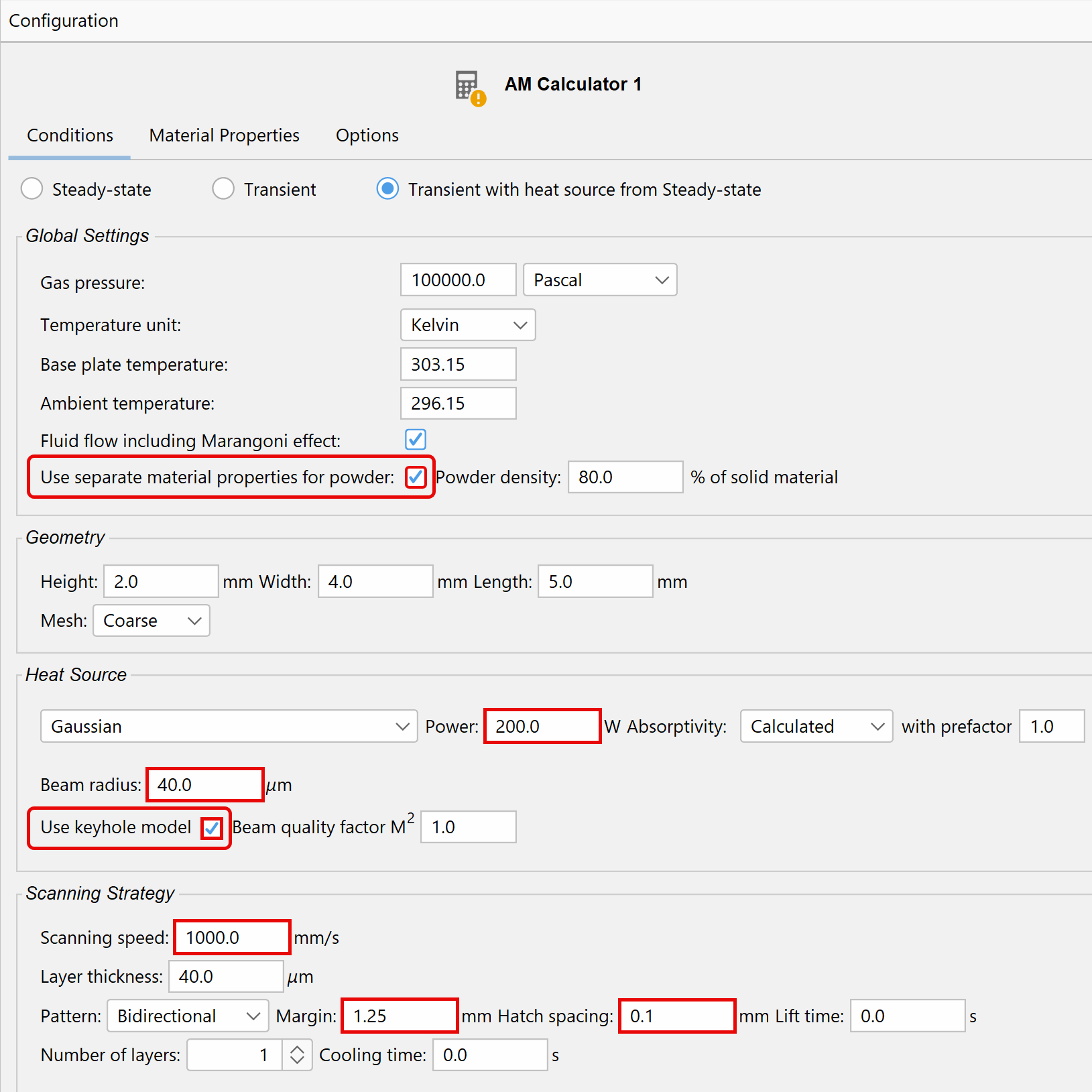
Now that the option Use separate material properties for powder has been improved and turned on by default, several default settings in the AM Module have been updated to more closely match common machine settings.

The updated default settings are as follows:

  • Separate powder material properties enabled (Except for Transient)
  • Power = 200 W
  • Beam radius:
    • Gaussian=40µm
      • Top-hat=110µm
        • Electron beam = 200µm
        • Keyhole model enabled
        • Scan Speed = 1000 mm/s
        • Scanning strategy:
          • Margin=1.25 mm
            • Hatch spacing=0.1 mm

New default settings in the AM Module as of 2026a.

Temperature Definitions Standardized in the Property Models

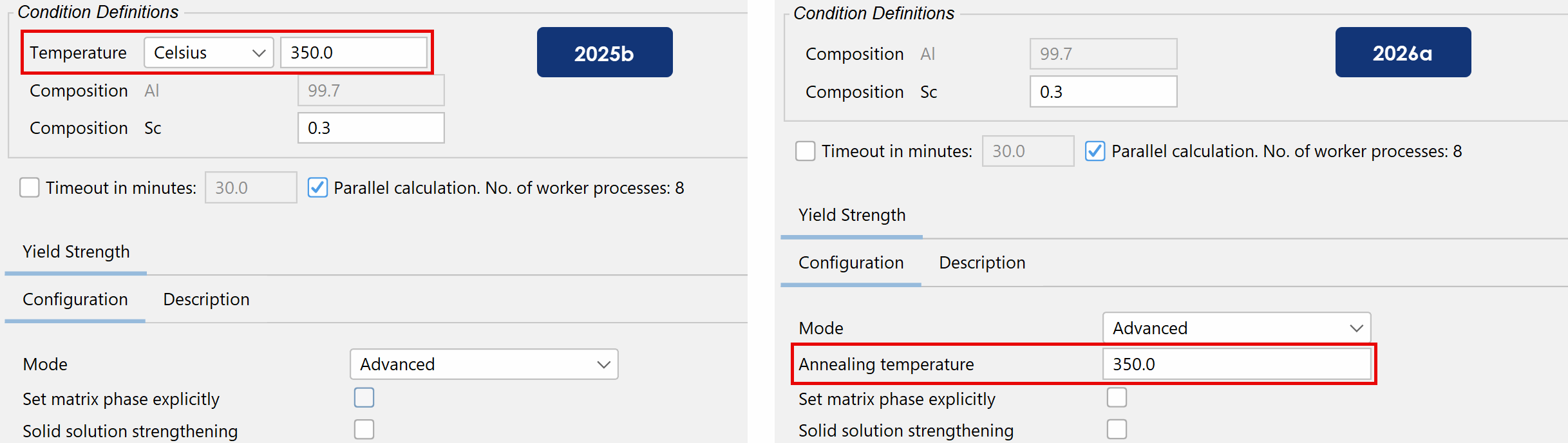
Temperature fields in the Property Models have been fully standardized to improve clarity and usability. Previously, the global Temperature field was used inconsistently between models, regardless of the specific temperature type, such as quenching, annealing, start, or end temperature. In addition, definitions for similar temperature types varied between models, and their placement within the interface was inconsistent.

With this update, the global temperature field has been removed, and all required temperature fields now use consistent definitions and descriptive names across every model. These changes also apply to plot quantities and any other areas where temperature fields appear in relation to the Property Models, ensuring uniformity and simplifying the setup process for users.

Property-Models-temperature-definitions-standardized-2026a

Comparison of a Yield Strength simulation set-up between 2025b, which uses the generic field name Temperature, and 2026a, which introduces the more descriptive Annealing Temperature and moves the temperature field to a new consistent location.

This standardization has also been implemented in TC-Python, which now uses the same names and definitions.

To see a complete list of the new temperature names and definitions, read the Release Notes.

Diffusion Module (DICTRA) Adds Mobility Adjustment

The Diffusion Module (DICTRA) adds a new configuration option, Mobility Adjustment, to the Graphical Mode. This new option allows users to adjust the mobility of individual phases to give more precise simulation results. Mobility can be set per element or for all elements in the phase. Previously, this feature was only available in Console Mode.

The new option is disabled by default but can be enabled in the new Mobility Adjustment section on the Diffusion Calculator Configuration window.

DICTRA-mobility-adjustment-2026a

A new Mobility Adjustment option allows users to adjust the mobility of individual phases to give more precise simulation results.

Eight New Databases with Significant Additions

Thermo-Calc 2026a includes eight new and one updated database, including the fully redesigned Aqueous Solutions Database, TCAQ4, which has been significantly expanded to be used with the new Aqueous Calculator.

New Databases

TCAQ4: Aqueous Solutions Database

The Aqueous Solutions Database, TCAQ4, has been fully redesigned and significantly expanded to be used with the new Aqueous Calculator, so much so that it can be considered an entirely new database from TCAQ3.

  • Fully redesigned to be used with the new Aqueous Calculator for detailed modeling of corrosion processes across diverse conditions.
  • 15 new elements: Am, Bi, Ge, Hf, Ir, Nb, Np, Pa, Pm, Pu, Rh, Ta, Tc, Ti, and Zr
  • While this database contains 91 elements, not all elements are available for all phases, as detailed below:
    • AQUEOUS: 76 elements
      • GAS: 27 elements
        • BCC_A2, FCC_A1, and HCP_A3: 65 elements
          • Stoichiometric oxide or hydroxide phases: 86 elements for 1614 phases
            • Terminal solid solution phases corresponding to stable element states: 24 elements for 17 phases
            • 1635 new phases (1637 total)
            • Unlike previous versions of this database, TCAQ4 does not require additional databases to be appended to complete complex aqueous calculations

TCPMAG3: Permanent Magnetic Materials Database

TCPMAG3 can now be used for a wide range of rare earth permanent magnet compositions from pure Nd2Fe14B to very complex NdFeB-based and SmCo-based commercial permanent magnetic materials. This release includes:

  • 10 new elements: Al, Cu, Ga, Gd, Ho, Nb, Si, Sm, Zn, Zr (19 total)
    • 209 new phases (263 total)
      • 102 new binary systems assessed (138 total)
      • 29 new ternary systems assessed (58 total)
      • Adds electrical resistivity and thermal conductivity
      • Several improvements to viscosity and surface tension

New Applications for TCPMAG3:

  • TCPMAG3 has extended its usage to include the SmCo-type permanent magnets, with the addition of Sm-related binary and ternary systems.
  • New elements have been added to the database to broaden the potential applications of novel rare-earth-based permanent magnetic materials. Al, Cu, and Zn can enhance the sintering of the magnet alloys; Ga improves both the intrinsic coercivity and the hot workability of the alloy; Gd addition enhances the temperature coefficient; and Nb is for grain refinement.

TCOX15: Metal Slag and Oxides Database

  • 2 new elements: Pb, Zn (36 total)
  • 120 new phases (864 total)
  • 73 new binary systems assessed (505 total)
  • 65 new ternary systems assessed (621 total)
  • 33 new quaternary systems assessed (327 total)
  • 1 new higher order system assessed (34 total)
  • Many descriptions improved
  • Several improvements to the thermophysical properties

New Applications for TCOX15:

  • The inclusion of zinc (Zn) and lead (Pb) in the TCS Metal Oxide Solutions Database (TCOX) means the database can be used to examine primary copper production.
  • Zn can also be an alloying element in steels and is a primary constituent in many of the spinel oxide systems.

TCFE15: Steel and Fe-Alloys Databases

  • 12 new elements: As, Bi, Ga, Gd, La, Li, Nd, Pb, Sb, Se, Sr, Te (41 + 1 total)
  • 341 new phases (806 total)
  • 315 new binary systems assessed (686 total)
  • 23 new ternary systems assessed (359 total)
  • Several important phase descriptions improved
  • Several improvements to the thermophysical properties
  • Elastic constants added for the new elements and improved in several systems

New Applications for TCFE15:

  • New elements have been added to the database to better predict the effect of tramp elements in Steels and Fe-based alloys.

MOBFE9: Steel and Fe-Alloys Mobility Database

  • 12 new elements: As, Bi, Ga, Gd, La, Li, Nd, Pb, Sb, Se, Sr, Te (41 total)
  • Several new and reassessed binary and ternary systems for BCC_A2 and FCC_A1 phases
  • Experimentally measured/DFT-calculated impurity diffusivity data for BCC_A2 phase added to 16 binary systems
  • Experimentally measured/DFT-calculated impurity diffusivity data for FCC_A1 phase added to 6 binary systems

TCTI7: Titanium and TiAl-based Alloys Database

  • 12 new elements: Au, Ca, Ce, Ga, Ge, La, Li, Nd, Sc, Sr, Yb, Zn (40 total)
  • 57 new phases (480 total)
  • 41 new binary systems assessed (320 total)
  • 9 new ternary systems assessed (120 total)
  • 7 ternary systems updated to strengthen the reliability in applications of shape memory alloys
  • Several other improvements

New Applications for TCTI7:

  • Ni-free β-Ti based alloys have been developed due to their excellent biocompatibility and low cost. The new elements are added to expand the application possibilities for novel functional materials.

MOBTI6: Titanium and TiAl-based Alloys Mobility Database

  • 12 new elements: Au, Ca, Ce, Ga, Ge, La, Li, Nd, Sc, Sr, Yb, Zn (40 total)
  • Experimentally measured/DFT-calculated impurity diffusivity data for BCC_A2 phase added to 17 binary systems
  • Experimentally measured/DFT-calculated impurity diffusivity data for HCP_A3 phase added to 2 binary systems
  • Several new and reassessed binary and ternary systems for BCC_A2 and ALTI_D019 phases
  • Several other improvements

MOBHEA4: High Entropy Alloys Mobility Database

  • 1 new element: Oxygen (27 total)
  • Parameters for O (oxygen) in the FCC_A1 phase were assessed or added: Cu-O, Fe-O and Ni-O
  • Parameters for O (oxygen) in the BCC_A2 phase were assessed or added: Fe-O, Ti-O, and Zr-O
  • Parameters for O (oxygen) in the other metals were estimated

Updated Databases

TCHEA8.1: High Entropy Alloys Database

TCHEA8.1 is available for free to everyone who has TCHEA8 and a current Maintenance & Support Subscription.

  • Corrected a typo in L (LIQUID,MNO,FEO3/2;0) of the [Fe, Mn, O] system 
  • Corrected the crystal structure information for M2O3H. It is the high temperature La2O3, its structure is now fixed: #H-La2O3 #hP10 #P6_3/mmc.

Let Us Help You

Is Thermo-Calc Right for You?

Talk to one of our experts to learn whether our tools or services fit your needs.